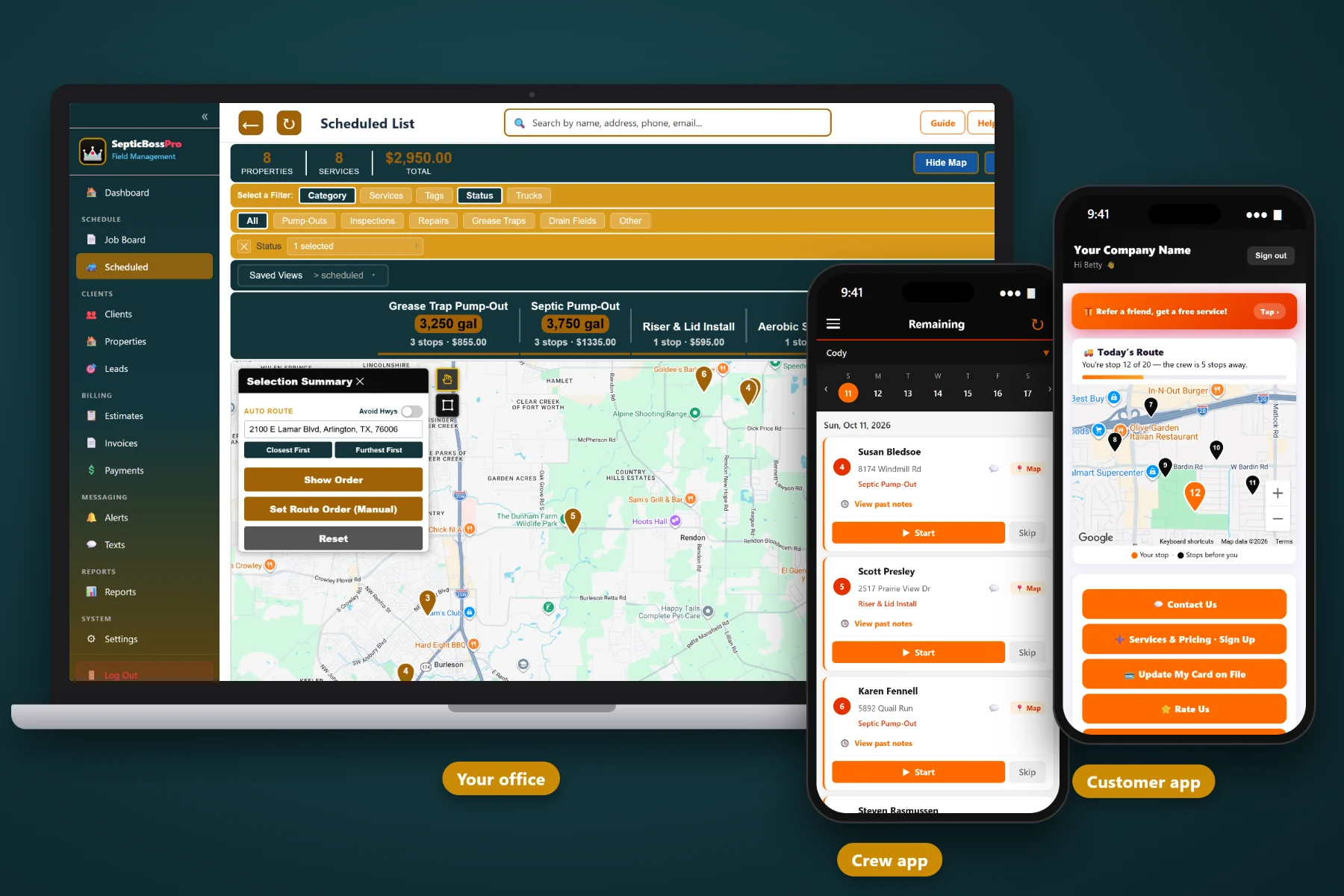
A septic route is not a delivery route. Every stop pulls gallons into a tank that only holds so much, every full load means a run to the disposal site, and half your customers live at the end of a gravel road twenty minutes from the next one. SepticBossPro puts your jobs on a route map, assigns them to trucks, and lets you order the stops with drive times in front of you, so every pump truck leaves the yard with a day that actually works.
Plans start at $59/month and you are never billed per user. Route maps, trucks, the dispatch board, and the crew app are part of the platform, not a pricey add-on you discover after signing. To see how routing fits with scheduling, records, and billing, start at SepticBossPro and then dig into route planning here.
Every scheduled job pinned on a map. Order the stops with drive times in view so the truck works outward and back instead of zig-zagging across the county.
Set up each pump truck and assign the day's stops to it. The vac truck, the service truck, and the install rig each get their own run.
Tank size in gallons, lid depth in inches, drain field size, and tank location notes live on the property, so you can plan loads and stop times before the truck rolls.
One board for the day. Pull jobs off the waiting list, slot them onto trucks, and reshuffle when an emergency backup calls in at 10am.
The crew mobile app reports where each truck is, so the office knows who is closest when a new call comes in and when a driver is heading to dump.
On-the-way and job-completed texts go out automatically, so homeowners unlock the gate and tie up the dog instead of calling the office.
The question every septic dispatcher answers is simple: how many tanks fit before this truck has to dump? SepticBossPro keeps the tank size on every property record, so when you lay out a route you can see the gallons stacking up stop by stop and decide where the disposal run belongs, instead of finding out in a driveway with a full truck and three stops left.
You do not need a logistics department to route four pump trucks. SepticBossPro keeps the route, the truck, the tank details, and the customer together, so the person answering the phone can build tomorrow's runs without a training course.
Bring in customers and properties with tank size, lid depth, drain field size, and tank location notes. That is the information every route decision depends on.
Work the waiting list and the job board: pick the pump-outs, inspections, and repairs for the day and assign them to the truck that makes sense.
See the stops pinned on the route map with drive times, put them in an order that keeps the truck moving, and plan where the disposal run lands.
Each driver sees the stops, the notes, and the tank details on the crew app, shares GPS, takes photos, and marks each job complete from the truck.
Most scheduling tools assume a tech drives to a job, works, and drives to the next one. A septic truck fills up. It has to dump. Its stops can be thirty miles apart on county roads. A route that ignores that is a route your driver rewrites from the cab.
Ask any septic dispatcher how the day really gets built and you will hear the same story: a wall map, a whiteboard, a stack of tickets, and a lot of memory. Which customer has a 1,500-gallon tank. Which lid is two feet down. Which farmhouse is past the low-water crossing. Which truck is already half full by ten.
That knowledge belongs in the system, not in one person's head. When it lives on the property record and shows up on the route, anyone in the office can plan a load and any driver can find the tank.
SepticBossPro is built so the route, the truck, and the tank details sit in one place, from the first phone call to the paid invoice.
Every tool here exists to get pump trucks through a full day with fewer wasted miles and fewer surprises in the driveway.
See every scheduled job pinned on the map and put the stops in an order that makes sense, with drive times in front of you.
Set up your trucks and assign each day's stops to the right one, whether it is the pump truck, the service truck, or the install crew.
One board for the whole day. Move jobs between trucks and reshuffle when a call comes in or a truck goes down.
Jobs that are not on a truck yet wait on the list, so nothing gets lost between the phone call and the route.
Set recurring pump-outs and inspections so repeat work comes back around without anyone rebuilding it by hand.
Pump-Outs, Inspections, Repairs, Installs, Grease Traps, and Drain Fields, so you can see what kind of work is on each route at a glance.
Tank size in gallons and lid depth in inches on every property, the two numbers that decide how long a stop takes and how fast a truck fills.
Where the tank sits, how big the drain field is, and anything the next driver needs to know, saved on the property.
Drivers run the day from the crew mobile app, which shares their GPS so the office can see where each truck is.
Drivers snap photos of the tank, the lid, or the problem they found, tied to the job for the office and the next visit.
Each stop is marked complete in the app, so the office knows where the route stands without calling the driver.
Customers get an automated text when the truck is on the way and when the job is done.
Turn completed route stops into invoices without retyping the job details.
Keep a card on file for repeat customers so completed pump-outs get paid without chasing a check.
Review the work your trucks completed and what it billed, so you can see which routes and days are pulling their weight.
Add every driver, helper, and office person. Plans are Start $59, Pro $89, and Crew $199 per month, not a per-seat charge.
The dispatch board is where routes turn into a plan. Jobs come off the waiting list, land on a truck, and get ordered on the map. When a backup call comes in, you can see which truck is nearby on GPS and slide the job in. For a full walkthrough of building, loading, and dispatching septic routes, read Septic Route Planning Software: The Complete Guide for Pumping Companies.
Residential tanks on a regular pumping cycle, grease traps on a tight schedule, inspection contracts that renew: recurring jobs are the backbone of a steady route. Set them up once and they come back around, ready to be placed on a truck alongside everything else due in that part of the county.
Pick the plan that fits your operation. Every plan starts with a 14-day free trial and no credit card.
Compare plans on the pricing page.
Yes. It keeps customer and property records with tank size, lid depth, drain field size, and tank location notes, and it organizes work into Pump-Outs, Inspections, Repairs, Installs, Grease Traps, and Drain Fields. Routing, dispatch, the crew app, texts, and invoicing all work from those records.
Scheduled jobs show up on a route map. You assign them to trucks and put the stops in order on the map with drive times in view. The waiting list and the dispatch board hold the jobs that still need a truck and a day.
No, and we will not pretend it does. What it gives you is the tank size on every stop and the drive times on the map, which is what you need to decide where in the route the dump run belongs.
Yes. Drivers use the crew mobile app, which shares GPS, lets them see job notes, take photos, and mark each stop complete.
Yes. Automated texts go out when the truck is on the way and when the job is completed.
Start is $59/month, Pro is $89/month, and Crew is $199/month. You are never billed per user, and every plan starts with a 14-day free trial with no credit card.
Route planning is one piece of how SepticBossPro runs a pumping business. For scheduling, records, and billing, see the full platform overview.
Practical reading on pump-truck routes, loads, dump runs, rural stops, and dispatch.
Route maps, trucks, tank details, live GPS, and customer texts in one place. Try SepticBossPro free for 14 days.