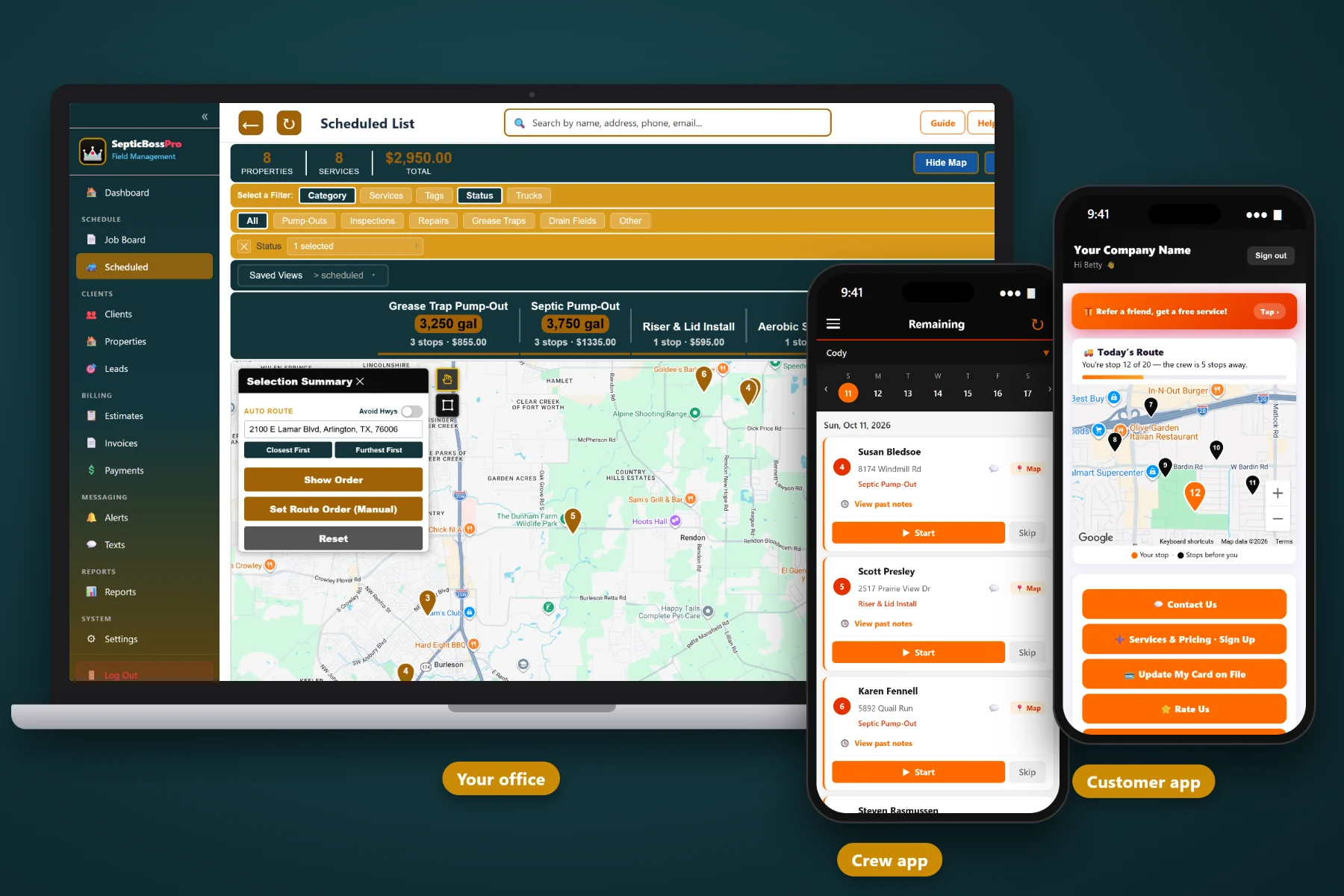
Generic customer lists hold a name and a phone number. SepticBossPro holds the tank — size, lid depth, drain field notes, where to dig and every visit you have ever made — and brings each customer back when their pump cycle comes due.
Septic work comes back around every few years, long enough that the homeowner forgets, the office forgets and the driver who found the lid has moved on. SepticBossPro keeps what your crews learn on the property record and turns it into scheduled return visits. New here? Start with Septic Customer Management Software: The Complete Guide for Pumping Companies.
Tank size in gallons, lid depth in inches, tank location notes and drain field notes on every property, plus custom fields for risers, filters, pump chambers or anything else you track.
Put the next pump-out on each property as a recurring job at the interval that fits the tank and household, so repeat work is on the schedule years ahead.
Automated texts and emails go out when service is due, and two-way texting brings replies back to the customer record instead of a driver's personal phone.
Track every caller as a lead, then send estimates for risers, baffles and repairs that customers approve online. Approved work moves straight to the schedule.
Bring your existing customer list across from a spreadsheet or old program. Fill in tank details as each property is serviced and the records improve every week.
Customers get a portal and app of their own. Drivers get the crew app with the property notes and can add photos that land back on the record.
Tanks don't move when owners do. SepticBossPro builds records around the property, so the tank size, the buried lid, the drain field and the full service history stay with the address through every phone number change, staff change and home sale.
A records system only works if the office and the drivers use it every day. SepticBossPro keeps each step short so the record gets better with every visit instead of going stale.
Export your existing customers to a spreadsheet and bring them in with the CSV import. Names, phones and service addresses are enough to start sending reminders and booking work.
Drivers add tank size, lid depth, location notes and photos from the crew app as each property is serviced. Within one pump cycle, your active customers have complete records.
Close out each pump-out by setting a recurring job at the right interval for that tank and household. Next year’s work is on the books before the truck leaves.
Automated texts and emails reach customers when service is due, and two-way texting brings replies back to the record so the office can book them.
Septic work is cyclical, the cycle is long and the most important details are buried in someone's backyard. A contact list built for sales teams was never designed for that.
The customer who should have called two years ago usually isn't unhappy. They simply forgot. When the drains slow down they search online and call whoever answers first — and the company that pumped their tank last time never got a chance to remind them.
Meanwhile the details that make the next visit fast — the tank size, the lid under eighteen inches of clay, the soggy corner of the drain field — live on a paper ticket or in one driver's head. When he leaves, so does the knowledge.
SepticBossPro puts all of it on the property record, puts the next pump-out on the schedule and sends the reminder for you.
Every tool connects back to the same property record, so what your crew learns in the yard shows up in the office, in the reminders and for the customer.
One client, as many properties as they own. Landlords, second homes and small commercial owners stay under one relationship while each address keeps its own tank record.
Record tank size in gallons on every property so quotes, truck planning and pump intervals all start from a real number instead of a guess.
Lid depth in inches tells the next driver how much digging to expect and helps the office quote excavation and recommend risers.
Directions anyone can follow, anchored to the foundation, the cleanout or the well, so a new driver walks straight to the lid.
Dated, factual notes on drain field conditions show trends over time and back up the recommendations your crew made.
Track risers, effluent filters, pump chambers, alarms, compartments or anything else your company needs to know about each system.
Tag clients and properties by service area, account type or follow-up needed, then pull the list when it is time to act.
Every completed job stays on the property, so you know when the tank was last pumped and what was found, even after the house sells.
Photos taken in the crew app attach to the property record: the lid, the riser, the baffles, the yard as you left it.
Set the next pump-out at the interval that fits each tank and household. Future work sits on the schedule, tied to the property.
Due-soon reminders and service messages go out automatically, whether the office is slammed or closed for the weekend.
Customer replies land in SepticBossPro next to their record, so every conversation is visible to the whole office.
Every caller becomes a lead with what they need and what you know, so no inquiry lives on a sticky note.
Send estimates for risers, baffles, filters and repairs. Customers approve online and the work moves to the schedule.
Bring your existing customer list across from a spreadsheet or old system instead of starting from zero.
Give customers a place of their own to connect with your company, built on the same records your office uses.
Assign jobs to drivers and trucks, with the tank details for every stop one tap away.
Drivers see the day’s stops and property notes, close out jobs and add photos without calling the office.
Invoice each job against the property and keep a card on file for repeat customers so payment does not need chasing.
See the work you have done, what has been invoiced and paid, and where your list needs attention.
Add every office staffer and driver without your bill climbing. Records only work when the whole team can use them.
Recurring jobs put every property's next pump-out on the schedule at the interval that suits the tank and the household. Automated texts and emails let the customer know, and two-way texting brings their reply straight back to the record. For the full walkthrough of records, reminders and the portal working together, read Septic Customer Management Software: The Complete Guide for Pumping Companies.
A new caller becomes a lead. A lead becomes a client with a property. A driver's note about a deep lid becomes a riser estimate the customer approves online. And between visits, customers have their own portal and app instead of only your phone number.
Add your office staff and every driver without your bill climbing. Every plan starts with a 14-day free trial and no credit card.
Compare everything included on each plan on the pricing page.
Practical guides on tank records, pump-cycle reminders, customer communication and getting your list organized.
Each property record holds tank size in gallons, lid depth in inches, drain field notes and tank location notes, plus custom fields for anything else you track, tags, the full service history and photos from the crew app.
Yes. A client can have multiple properties, and each property keeps its own tank record, recurring jobs and service history. That works well for landlords, second homes and small commercial owners.
You set a recurring job on each property at the interval that fits that tank and household. Automated texts and emails let the customer know when service is coming due, and replies come back through two-way texting.
Yes. SepticBossPro supports CSV customer import. Bring over names, contact details and service addresses, then fill in tank details as each property is serviced.
Yes. SepticBossPro includes a customer portal and app for your customers, built on the same records your office and crew use.
Plans are Start at $59/month, Pro at $89/month and Crew at $199/month. You are never billed per user, and every plan starts with a 14-day free trial with no credit card required.
Customer and tank records are one part of SepticBossPro, alongside scheduling, dispatch, the crew app and invoicing. See the full platform overview.
Put every tank on record and let SepticBossPro bring customers back when their pump cycle comes due. Try it free for 14 days.