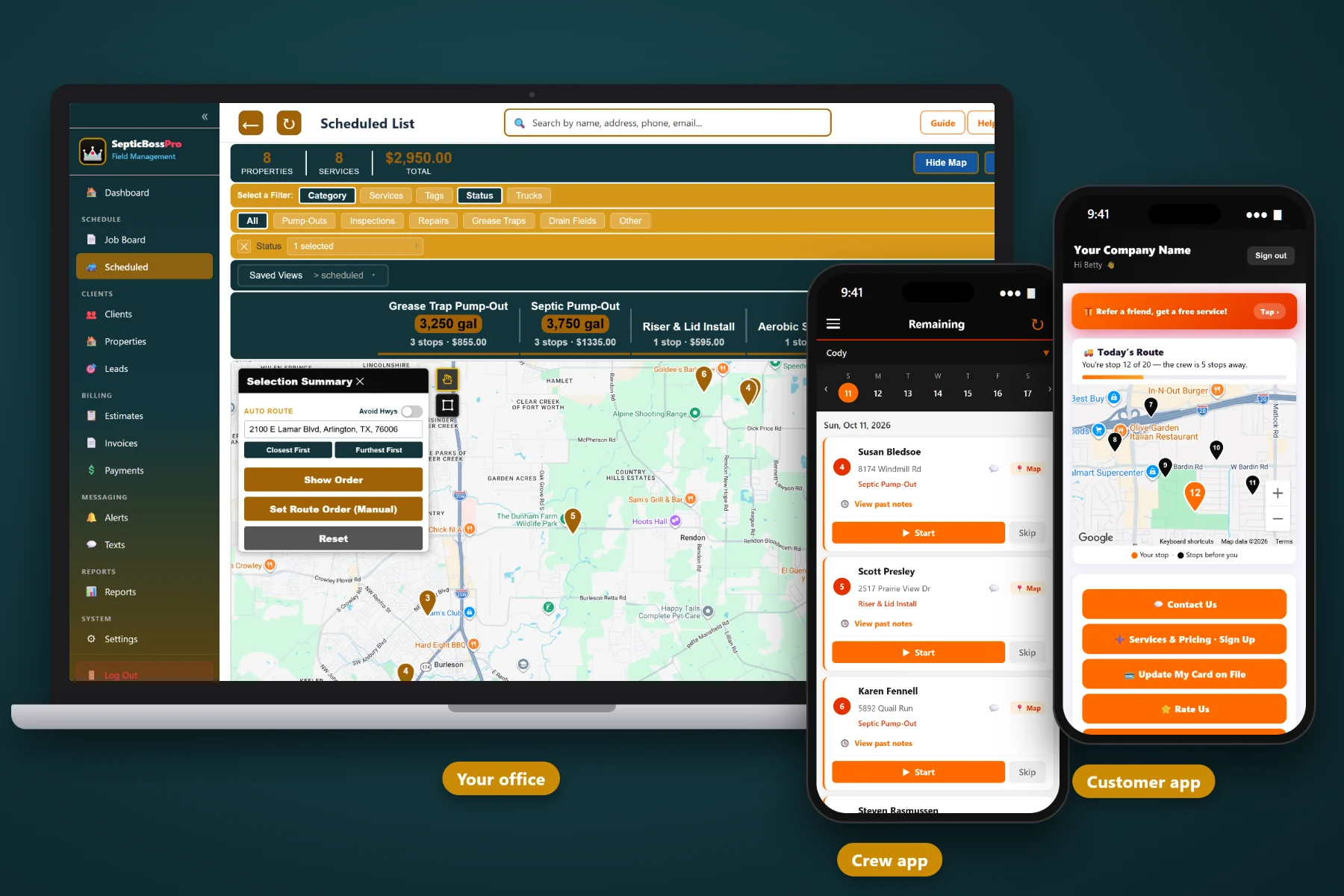
Running a septic company means juggling pump-outs, inspections on a closing deadline, emergency backups, drivers, and a stack of tank notes nobody else can read. SepticBossPro puts your tank records, scheduling, crews, and billing in one place so you can add a truck, hire a driver, and take on more work without the whole business living in your head.
SepticBossPro starts at $59/month, and it covers the whole job: the tank record, the schedule, the truck, the crew, the invoice, and the review request afterward. No per-user fees, so adding a driver never means rethinking your software bill.
Tank size, lid depth, drain field notes, and tank location notes saved on every property, so the next driver walks straight to the lids instead of probing the yard.
Recurring jobs for commercial and grease accounts, plus pump-cycle reminders that bring residential customers back when their tank is due, without you making the calls.
Confirmations, reminders, on-the-way messages, invoices, and review requests go out automatically, so your office answers fewer when-are-you-coming calls.
Invoice straight from completed jobs, keep a card on file, and auto-bill recurring accounts. Close the gap between the truck leaving and the money landing.
Give every driver, dispatcher, and office person their own login with the right access. Never billed per user, with unlimited users on the Crew plan.
Drivers see their stops and tank notes, take photos, clock in and out, and mark jobs complete, with GPS so you know where every truck is without calling.
Not every septic job needs a date the minute it comes in. Routine pump-outs, approved repairs, and installs waiting on dry ground sit on the waiting list until you have a truck in the area. Emergencies go straight onto the dispatch board. Your trucks stay realistic, and nothing gets lost on a sticky note.
The best system in the world is useless if your drivers go back to the clipboard. SepticBossPro keeps the office side complete and the truck side simple, so the whole company runs from the same information.
Bring over your active customers, their properties, and the tank details you already know. Old tickets can follow later. Start with what the truck needs tomorrow.
Lead, estimate, online approval, waiting list, dispatch, completed job, invoice, payment. Each step picks up where the last left off, so nobody retypes the same address three times.
Today's stops, the tank size, lid depth, and location notes, a camera for photos, the time clock, and a complete button. That is the whole job on a phone.
Pump-cycle reminders, booking confirmations, invoices, and review requests go out on their own, whether you are in the truck, at an estimate, or finally taking a day off.
One truck and one owner can run on memory, a whiteboard, and carbon-copy tickets. Two trucks and a hired driver cannot.
The day you hire a driver is the day you find out how much of the business lives only in your head. Which side of the house the tank is on. How deep the lids are. Which customer wants a call before you pull in. Which inspection has to be done before Friday's closing. None of that transfers on a whiteboard.
Generic field service software treats a septic job like any other service call, with tank details crammed into a notes field. SepticBossPro is built around how septic work actually runs. Start with Septic Business Software: The Complete Guide for Pumping Company Owners.
Get the records, the schedule, and the billing out of your head and into one system, and growth stops feeling like chaos.
Every tool in SepticBossPro serves one of three jobs: remember what matters about each tank, get the right truck to the right place, and turn finished work into collected money.
Keep customers and properties separate, with tank size, lid depth, drain field notes, and tank location notes on the property. When a house sells, the tank history stays with it.
Park non-urgent pump-outs, approved repairs, and weather-dependent work until you have a truck nearby, then schedule it in a click.
See every truck and every stop for the day. Move jobs between trucks when an emergency comes in and keep the rest of the day on track.
Pump-Outs, Inspections, Repairs, Installs, Grease Traps, and Drain Fields, so you can see what kind of day each truck faces and how each line of work performs.
Put grease traps and commercial accounts on a recurring schedule so the visit lands on the board automatically.
When a tank comes due, the customer gets a reminder to book. Repeat work finds you instead of drifting to whoever answers first.
See stops and waiting jobs on the map, group work by area, and plan days that keep trucks pumping instead of driving.
Set up your trucks and assign jobs to them so you know what each truck is doing every day.
GPS, job photos, a time clock, and mark complete, all from the driver's phone, with tank notes in hand before they arrive.
Give each person their own login with access set by role, so everyone sees what they need and nothing they shouldn't.
Booking confirmations, reminders, on-the-way messages, and invoices go out automatically, cutting down the calls your office fields.
An automated review request after each completed job, so happy customers actually leave the review they meant to.
Capture every new inquiry, track where it came from, and follow it through to an estimate and a booked job.
Send repair and install estimates the same day and let the customer approve from their phone. Approved work moves straight to scheduling.
Invoice from completed jobs without retyping, and see what is paid and what is still out.
Keep cards on file for repeat customers and auto-bill recurring accounts so payment simply happens.
Jobs, revenue, unpaid invoices, and crew time in one place, so a weekly check-in takes minutes instead of an afternoon.
Put a lead form on your website and send requests straight into your leads list instead of an inbox nobody checks.
The jump from one truck to two is where most septic owners feel the strain. SepticBossPro gives every driver the information you used to carry in your head, and gives you a clear view of every truck without riding along. Thinking about that step? Read When to Add a Second Pump Truck to Your Septic Business.
Septic repairs stall when estimates go quiet, and cash gets tight when invoices go out a week late. SepticBossPro keeps the whole chain moving: estimate, online approval, scheduled job, completed job, invoice, payment. Want the pricing side first? Read How to Price Septic Pump-Outs So Every Truck Day Makes Money.
Hiring a driver should be a business decision, not a software decision. Pick the plan that fits your stage and move up when the company does.
14-day free trial. No credit card required.
Owner-level guides on pricing, hiring, referrals, reviews, seasonality, and growing from one truck to a fleet. Start with the first and work forward.
Yes. It stores tank size, lid depth, drain field notes, and tank location notes on every property, organizes work into Pump-Outs, Inspections, Repairs, Installs, Grease Traps, and Drain Fields, and sends pump-cycle reminders that bring customers back when their tank is due.
Yes. Set up your trucks, assign jobs on the dispatch board, plan with route maps, and see where each truck is through crew GPS on the mobile app.
Just a phone. The crew mobile app shows the day's stops with tank details, takes job photos, runs the time clock, and lets the driver mark each job complete.
That is the point. Customer and property records, scheduling, the waiting list, estimates, invoicing, and reports all live in one system your whole team can reach.
Never. SepticBossPro is never billed per user. The Crew plan at $199/mo includes unlimited users.
Start is $59/mo, Pro is $89/mo, and Crew is $199/mo. Every plan starts with a 14-day free trial and no credit card.
SepticBossPro runs the whole septic operation — tank records, scheduling, crews, and billing — from one platform. See the full SepticBossPro platform overview.
Put your tanks, trucks, crews, and billing in one place. Try SepticBossPro free for 14 days.